Showing posts with label software. Show all posts

30 June 2008

Automatically switching on the firewall by location on Mac OS X

There is something that Windows Vista actually does rather well. When you connect to a network to which you have not previously connected, Vista will prompt you to say whether it is Home, Work or Public. Naturally when you connect to some sort of unencrypted network at a Cafe, University or wherever you are going to want to select Public - basically this puts the firewall up to full strength to stop services like file and printer sharing from telling the world what it is you have on your laptop. (I'm simplifying things here - if you unblock services while Public for example you could still be opening yourself to a world of pain because it will be unblocked for all public places).
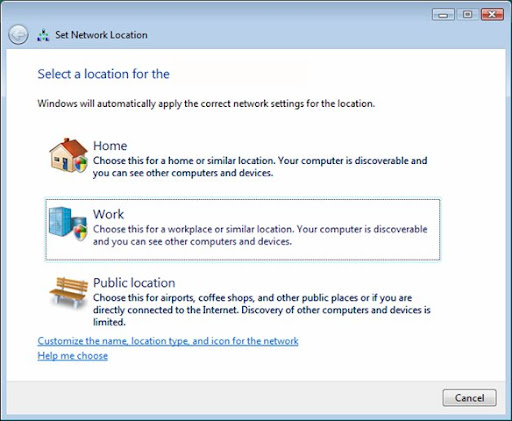
I assume people are mostly still using XP because it seems no matter where I go in public (well maybe not everywhere) there's someone who has neglected to lock down their system, even to the extent that they have write access open to their OS / data partition.

Mac OS X doesn't seem to have this feature at all. Yes, it has network locations but they don't cover the firewall, nor can they be set to automatically switch. But there is a way.

First, we need to do how to programmatically change the network settings. The answer comes from (the really rather useful) macosxhints.com.

sudo defaults write /Library/Preferences/com.apple.alf globalstate -int 1
The last value represents the state of the firewall, where:
  • 0 = off
  • 1 = on for specific services
  • 2 = on for essential services
Note that actually the 'sudo' isn't required for this if you have an administrator account. So I created two very simple shell scripts based on this command, one which turns on the firewall and one which turns it off.

The second part of this is the great MarcoPolo. In a nutshell, MarcoPolo can automatically do whatever you want whenever you want based on various physical attributes like the Wifi access points it can see, bluetooth devices and even ambient light (among other things). Unfortunately it hasn't been properly updated for Leopard, so it can't switch the firewall itself - but it can be set to run shell scripts.

So this is what I have going. When I'm at home, MarcoPolo automatically sees my home WiFi and switches the firewall into a low paranoia state (so I can access my files etc). When I leave home, MarcoPolo battens down the hatches to prepare me from those people interested in my SSH, my files or my Apache server.

It's a great thing really - but it should be easier. Here's hoping Apple considers some sort of Vista style automatic switching at some stage.

21 February 2008

Mythbox: Software


I remember when I initially considered building a media PC, I had thought that I would base it on Mediaportal. Mediaportal runs on Windows and does pretty much all that you'd want a media center application to do. The only problem with it is that it crashes like hell for me there - I don't want to take the risk for the main TV.

GB-PVR, also for Windows is another very similar, though mush lighter weight contender. I strongly considered GB-PVR, partly for its ability to run on Windows 2000. Plus, it's fairly easy to set up and stable.

Windows Media Center is the other oft-used option. However the limitations here are artificial and infuriating. For example, the way Media Center restricts you to two tuners or that it doesn't support DVB-S natively, nor does it support any HD options outside of the US. This somehow seems unacceptable for such a product. On the plus side, Media Center has probably the best user interface of the bunch.

This leaves MythTV, the relatively stable (if impossibly difficult to configure) usually Linux based DVR software. MythTV sure has the features and it has the advantage of being itself completely free along with the operating system on which it usually runs. I chose mythbuntu as my flavour of choice. Given that cost is my primary driver for this mythbox, I felt that MythTV presented the only real option (all others discussed would have required a Windows license - and product activation on a DVR. That sure doesn't feel right.)

The pros and cons:

MediaPortal

+ Lots of features
+ Itself free and open source
- Requires a Windows license
- A little crash happy

GB-PVR

+ Stable and snappy
+ Nice and lightweight
+ Able to run on Windows 2000
- Requires a Windows license

Windows Media Center

+ Nice, intuitive user interface
+ Relatively easy to set up
+ Media extenders available
- Requires a Windows license, Windows Vista to get newest version
- Stupid tuner number limitations
- Lack of DVB compatibility

MythTV

+ Features galore
+ Highly configurable
+ Relatively stable
+ Completely free
+ Media extenders easy to build or buy
- Hellishly difficult to configure
- Notoriously bad support and documentation

MythTV's definitely got what I need, I'm just hoping I'm up to the set-up task.

12 February 2008

Vista Sucks: Where's the frickin back button?


Gah! What were they thinking? Hey Microsoft listen to me and repeat - consistency, consistency, consistency. There, how does that feel? Now put it into practice. What you should not do is have a text-based Next button in the bottom right of a wizard dialogue and a graphical button in the top left.

Bad, Microsoft, Bad! Now hang your heads in shame and go work on that next version.